Performance Engineering – JVM Heap Structure
JVM – Heap Structure
- Inside JVM, there exist separate memory spaces (Heap, Non-Heap, Cache) in order to store runtime data and compiled code.
- Heap Memory
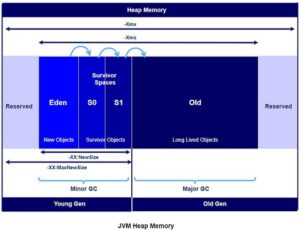
- Heap is divided into 2 parts
- Young Generation
- Old Generation
- Heap is allocated when JVM starts up and Heap size increases/decreases while the application is running
- Heap is divided into 2 parts
-
- Young Generation
- A reserved memory for newly allocated objects which consists of
- One Eden Memory
- A reserved memory for newly allocated objects which consists of
- Young Generation
-
-
-
-
- Most of newly instantiated entities gets into Eden Memory. When Eden space is filled with objects, Minor GC is performed and all the survivor objects are moved to one of the survivor spaces.
- Minor GC also checks the survivor objects and move them to the other survivor space. So at a time, one of the survivor space is always empty.
- Two Survivor Memory areas (S0, S1)
- Objects that are survived after many cycles of GC, are moved to the Old generation memory space.
-
-
- Old Generation
- This memory is reserved for storing long lived objects which could survive after many rounds of Minor GC
- When Old Gen space is full, Major GC is performed
-
- Non-Heap Memory
- Non-Heap Memory includes Permanent Generation (Replaced by Meta space since Java 8)
- Permanent Generation stores per-class structures such as runtime constant pool, field and method data, and the code for methods and constructors, as well as interned Strings
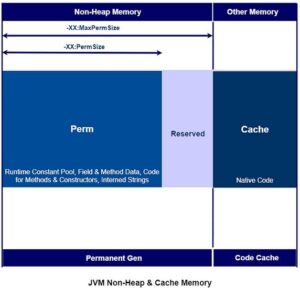
- Cache Memory
- Stores compiled code (i.e. native code) generated by JIT compiler, JVM internal structures, loaded profiler agent code and data, etc.
- When Code Cache exceeds a threshold, it gets flushed (and objects are not relocated by the GC).
Configuration of Heap Size in JVM
- Access any application that’s designed to run on JVM / a Java based application, and view its configuration(Eg: Tomcat)
- {Tomcat Home Directory}/bin/catalina.bat
-
-
- set CATALINA_OPTS = -Xloggc : ”{tomcat\logs\filename.log}” -XX : +PrintHeapAtGC -XX : +PrintGCDetails – XX : + PrintGCTimeStamps -XX : +HeapDumpOnOutOfMemoryError -XX : HeapDumpPath ={tomcat\logs\heapdump.bin} -Xms128m -Xmx256m -XX : + UseSerialGC
-
- Observe the heap configuration -Xms which is minimum value and -Xmx which is maximum value. It is suggested for heap to have 1/4th of RAM size
- Depending on the application’s performance, adjust the minimum and maximum size values. Each application has its own performance constraints and accordingly adjust the minimum and maximum size values.
- Understand that by increasing the heap size value do not resolve the bottom line problem.
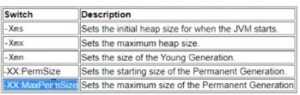
- The below heap related switches are for quick reference
Memory Related Issues
- When there is a critical memory issue, the JVM gets crashed and throws an error indication in your program output like below.
- java.lang.StackOverFlowError — indicates that Stack Memory is full
- java.lang.OutOfMemoryError: Java heap space — indicates that Heap Memory is full
- java.lang.OutOfMemoryError: GC Overhead limit exceeded — indicates that GC has reached its overhead limit
- java.lang.OutOfMemoryError: Permgen space — indicates that Permanent Generation space is full
- java.lang.OutOfMemoryError: Metaspace — indicates that Metaspace is full (since Java 8)
- java.lang.OutOfMemoryError: Unable to create new native thread — indicates that JVM native code can no longer create a new native thread from the underlying operating system because so many threads have been already created and they consume all the available memory for the JVM
- java.lang.OutOfMemoryError: request size bytes for reason — indicates that swap memory space is fully consumed by application
- java.lang.OutOfMemoryError: Requested array size exceeds VM limit– indicates that our application uses an array size more than the allowed size for the underlying platform
-By Saravanan & Sai Krishna

You may also like


Observability and Monitoring – Same or Different?
March 23, 2023