AI Automation with Selenium WebDriver & Java: From Basics to CI/CD Integration (In Hindi)
(Learn Selenium automation from fundamentals to frameworks with Java. Integrate AI, Git, and Jenkins for next-gen CI/CD automation.)
This course is designed to take you from Selenium basics to advanced, real-world automation skills using Java, TestNG, and Cucumber frameworks. You’ll learn how to build robust automation frameworks, handle dynamic web applications, and integrate your tests with Git and Jenkins for continuous integration.
With a dedicated AI module, you’ll also explore how tools like Healenium, ChatGPT, and Copilot are transforming test automation with self-healing locators and AI-assisted script generation — preparing you for the next generation of automation testing.
About the Instructor:
|
Dilip Kumar is an accomplished Senior Software Test Engineer with deep expertise in automation testing across Web, Mobile, and API platforms. With hands-on experience in Selenium, Appium, Cypress, and Postman, he has built and optimized automation frameworks for real-world enterprise projects. Proficient in Java, Python, and JavaScript, Dilip brings a strong command of designing scalable Selenium frameworks using TestNG, Cucumber (BDD), and integrating them with Git and Jenkins for CI/CD pipelines. His practical exposure to AI-driven automation tools like Healenium and ChatGPT-based testing assistance adds a modern edge to his teaching approach. Known for his clarity and learner-focused delivery, Dilip simplifies complex automation concepts — guiding learners step-by-step through Selenium fundamentals, framework development, AI integration, and end-to-end test execution with real-world examples. |
Live Sessions Price:
For LIVE sessions – Offer price after discount is 300 USD 259 89 USD Or USD13000 INR 12900 INR 6900 Rupees
OR
What will I learn by the end of this course?
- Gain a strong foundation in Selenium WebDriver with Java and core automation concepts.
- Master TestNG and Cucumber (BDD) frameworks for structured, scalable testing.
- Build and execute end-to-end automation frameworks for web applications.
- Work confidently with locators, waits, alerts, frames, and web elements.
- Perform data-driven testing using Excel and JSON files.
- Implement version control and CI/CD using Git, GitHub, and Jenkins.
- Explore AI-powered testing tools like Healenium and ChatGPT for smart test automation.
- Learn to debug, maintain, and optimize automation scripts for real-world projects.
- Become job-ready to work as a QA Automation Test Engineer with modern tool integration skills.
✨ Recently, we have completed the demo sessions for our current batch. The next batch will be scheduled soon.
📌 To know more details and get complete information about the course, please register using the “Enroll for Free Demo” button, or you can directly reach out to us using the WhatsApp button above.
🙏 Thank you for your interest! Once the new batch date and time are finalized, we will get in touch with you.
What students have to say about Dilip Kumar:
|
👩 Aliza Mohammed 👨 Rohit Kumar 👩 Maria D’Souza 👩 Priya Reddy 👨 Arjun Patel |
Salient Features:
- The course will be delivered completely in Hindi
- 35 Hours of Live Training along with recorded videos
- Lifetime access to the recorded videos
- Course Completion Certificate
Who can enroll for this course?
- Beginners who want to start a career in automation testing.
- Manual testers aiming to transition to automation testing with Selenium.
- QA professionals looking to upgrade skills with Java, frameworks, and CI/CD tools.
- Developers interested in learning test automation best practices.
- Anyone keen on exploring AI-powered testing tools and modern automation frameworks.
- Students or professionals seeking hands-on experience in real-world automation projects.
Course syllabus:
- Introduction to Web Automation & Selenium
- What is Software Testing and its different concepts?
- Differences between Manual Testing and Automation Testing
- Understanding Web, Mobile, API Testing Difference
- What is Automation Testing and its advantages?
- Features and Limitations of Selenium
- Different components of Selenium (IDE, RC, Webdriver, Grid)
- Architecture of Selenium WebDriver
- Selenium Setup & Installation
- Prerequisites for Selenium WebDriver
- Installation of Java JDK and IntelliJ
- Setting up Maven Project for selenium
- Setup of xml and understanding Maven dependencies
- Creating and Running First Selenium Script (Opening Browser)
- WebPage Commands (Open url, Close browser, Get title, Current url, Page Source…)
- Browser Resize Commands (Minimize, Maximize, Fullscreen Browser)
- Browser Navigation Commands (Go Back, Go Forward, Refresh Page)
- Core Java and OOPS Concepts
- Setup Java environment – Download JDK and Setup IntelliJ
- Java programming concepts and it’s features
- Packages, Variables and Data-Types
- Collections – Set, List, Array
- Conditions and Loops
- Methods in Java
- OOPs concepts – Class, Object, Abstraction, Encapsulation, Polymorphism & Inheritance
- Access modifiers and Constructors
- Exception Handling in Java
- Locators and Basic Web Elements Handling
- How to inspect elements using DevTools and Selectors Hub
- Types of Locators: ID, Name, ClassName, TagName, LinkText, PartialLinkText, XPath, CSSSelector
- Difference between Absolute and Relative Xpath
- Multiple ways of writing locators for Xpath and CSSSelector
- WebElement Actions like getting Attributes, CSS properties, Size, Location of Webelements, etc…
- Working with Text Boxes, Buttons, Radio Buttons and Check Boxes
- Working with Drop Downs (Static, Auto-Suggestive, Span Drop Downs)
- Working with TestNG Assertions in Selenium-Java
- Advanced Actions with Selenium WebDriver
- Handling Alerts (Accept, Dismiss, Get Text of Alert)
- Handling New Tabs and Windows and performing actions
- Handling iFrames and performing actions
- Working with Synchronization like Implicit Wait and Explicit Wait
- Handling Mouse Actions (Hover, Right Click, Double Click, Slider, Scrolling, Drag & Drop, etc…)
- Keyboard Action (Backspace, Space, Enter, etc…)
- Handling File Upload/Download (Single and Multiple Files)
- Handling Web Tables (Getting rows, columns, data, pagination)
- Taking Screenshots (Element and Full Page)
- Handling Date-Picker and Shadow DOM Elements
- Working with JavaScriptExecutor Elements
- Chrome Options (Handling Headless browser, SSL certificate error, etc…)
- Framework – TestNG and POM
- What is TestNG and POM Framework
- Configuration & Development of Professional Framework
- Execution of Simple Test in Framework
- Execution using Action Helpers in Framework
- Execution using POM Model in Framework
- Execution for different tags like smoke, regression, etc…
- Reading data from Excel, Json files
- HTML Report generation
- Framework – Cucumber (BDD)
- Introduction to Cucumber and BDD Framework
- Importance of BDD
- Setup Cucumber with IntelliJ
- features in Cucumber (BDD)
- Structure of Cucumber: Step definitions, Test Runner, Feature files
- Scenario Outline & Data-Driven Testing
- Background in Cucumber for common Steps
- Tags in cucumber like smoke, regression, etc…
- HTML Reports in Cucumber
- AI in Test Automation (Advanced Module)
- Introduction to AI in Software Testing
- Traditional vs AI-driven Automation
- AI-based Self-Healing Locators using Healenium
- AI-generated Test Cases and Test Data (ChatGPT + Faker)
- Integrating AI Assistance (ChatGPT/Github Copilot) in Test Script Creation & Debugging
- Future of AI in Automation Testing
- Git & GitHub for Selenium
- Introduction to Git & GitHub
- Advantage of Version Control System
- Setting up a GitHub repository for test automation
- Cloning Git Repository in local machine
- Basic Git Commands (push, pull, add, status, branch, merge, rebase, etc…)
- Pull request in github
- Merging branch and resolving conflicts
- Git Bash Tool Usage
- Jenkins Setup for Selenium (CI/CD Integration)
- What is Jenkins
- Install and setup Jenkins
- Integration of Jenkins with GitHub
- Creation of a new job in Jenkins
- Execution of Test Scripts in Jenkins
- Generating HTML Reports & Sending E-Mails on Failures of execution
How can I enroll for this course?
OR
For any other details, Call me or Whatsapp me on +91-9133190573
Live Sessions Price:
For LIVE sessions – Offer price after discount is 300 USD 259 89 USD Or USD13000 INR 12900 INR 6900 Rupees
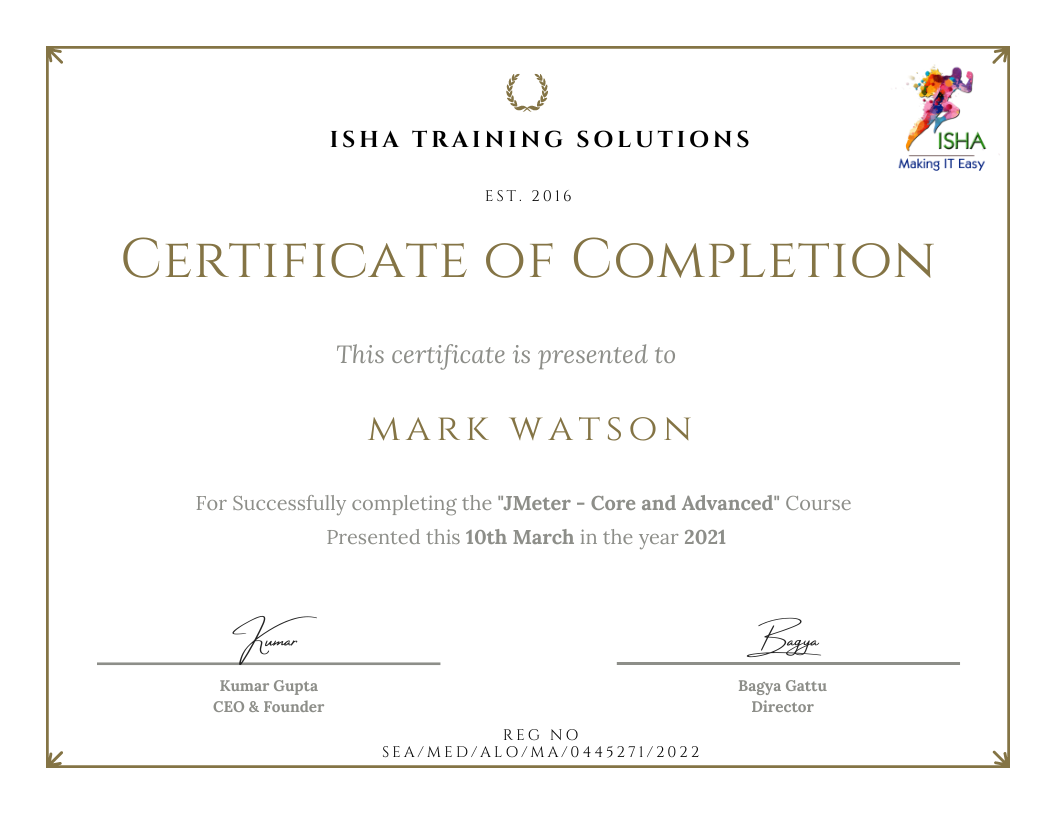
Sample Course Completion Certificate:
Your course completion certificate looks like this….
Important Note:
To maintain the quality of our training and ensure smooth progress for all learners, we do not allow batch repetition or switching between courses. Once you enroll in a batch, please make sure to attend the classes regularly as per the schedule. We kindly request you to plan your learning accordingly. Thank you for your support and understanding.
Course Features
- Lectures 81
- Quiz 0
- Duration 35 hours
- Skill level All levels
- Language English
- Students 0
- Assessments Yes
- 10 Sections
- 81 Lessons
- 35 Hours
- Introduction to Web Automation & Selenium7
- 1.1What is Software Testing and its different concepts?
- 1.2Differences between Manual Testing and Automation Testing
- 1.3Understanding Web, Mobile, API Testing Difference
- 1.4What is Automation Testing and its advantages?
- 1.5Features and Limitations of Selenium
- 1.6Different components of Selenium (IDE, RC, Webdriver, Grid)
- 1.7Architecture of Selenium WebDriver
- Selenium Setup & Installation8
- 2.1Prerequisites for Selenium WebDriver
- 2.2Installation of Java JDK and IntelliJ
- 2.3Setting up Maven Project for selenium
- 2.4Setup of POM.xml and understanding Maven dependencies
- 2.5Creating and Running First Selenium Script (Opening Browser)
- 2.6WebPage Commands (Open url, Close browser, Get title, Current url, Page Source…)
- 2.7Browser Resize Commands (Minimize, Maximize, Fullscreen Browser)
- 2.8Browser Navigation Commands (Go Back, Go Forward, Refresh Page)
- Core Java and OOPS Concepts9
- 3.1Setup Java environment – Download JDK and Setup IntelliJ
- 3.2Java programming concepts and it’s features
- 3.3Packages, Variables and Data-Types
- 3.4Collections – Set, List, Array
- 3.5Conditions and Loops
- 3.6Methods in Java
- 3.7OOPs concepts – Class, Object, Abstraction, Encapsulation, Polymorphism & Inheritance
- 3.8Access modifiers and Constructors
- 3.9Exception Handling in Java
- Locators and Basic Web Elements Handling8
- 4.1How to inspect elements using DevTools and Selectors Hub
- 4.2Types of Locators: ID, Name, ClassName, TagName, LinkText, PartialLinkText, XPath, CSSSelector
- 4.3Difference between Absolute and Relative Xpath
- 4.4Multiple ways of writing locators for Xpath and CSSSelector
- 4.5WebElement Actions like getting Attributes, CSS properties, Size, Location of Webelements, etc…
- 4.6Working with Text Boxes, Buttons, Radio Buttons and Check Boxes
- 4.7Working with Drop Downs (Static, Auto-Suggestive, Span Drop Downs)
- 4.8Working with TestNG Assertions in Selenium-Java
- Advanced Actions with Selenium WebDriver12
- 5.1Handling Alerts (Accept, Dismiss, Get Text of Alert)
- 5.2Handling New Tabs and Windows and performing actions
- 5.3Handling iFrames and performing actions
- 5.4Working with Synchronization like Implicit Wait and Explicit Wait
- 5.5Handling Mouse Actions (Hover, Right Click, Double Click, Slider, Scrolling, Drag & Drop, etc…)
- 5.6Keyboard Action (Backspace, Space, Enter, etc…)
- 5.7Handling File Upload/Download (Single and Multiple Files)
- 5.8Handling Web Tables (Getting rows, columns, data, pagination)
- 5.9Taking Screenshots (Element and Full Page)
- 5.10Handling Date-Picker and Shadow DOM Elements
- 5.11Working with JavaScriptExecutor Elements
- 5.12Chrome Options (Handling Headless browser, SSL certificate error, etc…)
- Framework – TestNG and POM8
- 6.1What is TestNG and POM Framework
- 6.2Configuration & Development of Professional Framework
- 6.3Execution of Simple Test in Framework
- 6.4Execution using Action Helpers in Framework
- 6.5Execution using POM Model in Framework
- 6.6Execution for different tags like smoke, regression, etc…
- 6.7Reading data from Excel, Json files
- 6.8HTML Report generation
- Framework – Cucumber (BDD)9
- 7.1Introduction to Cucumber and BDD Framework
- 7.2Importance of BDD
- 7.3Setup Cucumber with IntelliJ
- 7.4features in Cucumber (BDD)
- 7.5Structure of Cucumber: Step definitions, Test Runner, Feature files
- 7.6Scenario Outline & Data-Driven Testing
- 7.7Background in Cucumber for common Steps
- 7.8Tags in cucumber like smoke, regression, etc…
- 7.9HTML Reports in Cucumber
- AI in Test Automation (Advanced Module)6
- 8.1Introduction to AI in Software Testing
- 8.2Traditional vs AI-driven Automation
- 8.3AI-based Self-Healing Locators using Healenium
- 8.4AI-generated Test Cases and Test Data (ChatGPT + Faker)
- 8.5Integrating AI Assistance (ChatGPT/Github Copilot) in Test Script Creation & Debugging
- 8.6Future of AI in Automation Testing
- Git & GitHub for Selenium8
- 9.1Introduction to Git & GitHub
- 9.2Advantage of Version Control System
- 9.3Setting up a GitHub repository for test automation
- 9.4Cloning Git Repository in local machine
- 9.5Basic Git Commands (push, pull, add, status, branch, merge, rebase, etc…)
- 9.6Pull request in github
- 9.7Merging branch and resolving conflicts
- 9.8Git Bash Tool Usage
- Jenkins Setup for Selenium (CI/CD Integration)6