
AI Powered Playwright Python Automation AI Chatbot, UI, AI, API, CI/CD & Ollama LLM Evaluation
(Playwright, Python, Pytest, Page Object Model, UI & API Testing, CI/CD, GitHub Actions, ChatGPT, AI Chatbots, Ollama & LLM Evaluation)
The Playwright with Python Automation Training is designed to help learners develop practical skills in modern web application automation, API testing, and AI-powered testing. This course covers the fundamentals of Playwright with Python, PyTest, test framework development, the Page Object Model (POM), test data management, and automation best practices.
Through hands-on exercises and real-time projects, learners will gain experience in automating web applications, handling dynamic web elements, performing API testing, generating test reports, and integrating automated tests into CI/CD pipelines. The course also explores AI and LLM chatbot testing, helping learners understand how to validate AI-driven applications and evaluate their responses.
By the end of this training, learners will be able to design, develop, execute, and maintain scalable automation frameworks using Playwright and Python, preparing them to apply modern automation techniques to real-world software testing projects.
About the Instructor:
| Karthick is an experienced Forward-Deployed Engineer (FDE), AI Engineer, and Trainer with 10+ years of overall industry
Tripura is an experienced Automation Testing Professional specializing in Playwright, Python, Selenium, PyTest, API Testing, and CI/CD integration. With over 8 years of industry experience, she has worked on real-world automation projects, developing scalable and maintainable test automation frameworks for web applications and APIs. Having trained and mentored 300+ students across 15+ training batches, Tripura follows a practical, example-driven teaching approach that makes complex automation concepts easier to understand. Her training emphasizes hands-on coding, framework development, debugging techniques, and industry best practices. Throughout the course, learners gain practical exposure to building automation frameworks using Playwright and Python, implementing the Page Object Model (POM), integrating automated tests with GitHub Actions, and exploring AI/LLM-based chatbot testing. Her goal is to help learners strengthen their automation skills and develop the confidence to apply modern testing techniques to real-world projects. |
Live Sessions Price:
For LIVE sessions – Offer price after discount is 200 USD 159 89 USD Or USD15000 INR13000 INR 6900 Rupees
OR
Free Demo On:
Indian Timings: 3rd November @ 7:30 AM – 8:30 AM (IST)/
U.S Timings: 2nd November @ 9:00 PM – 10:00 PM (EDT)/
U.K. Timings: 26th October @ 2:00 AM – 3:00 AM (BST)
Class Schedule:
For Participants in India: Monday – Friday @ 7:30 AM – 8:30 AM (IST)/
For Participants in the US: Sunday – Thursday @ 9:00 PM – 10:00 PM (EDT)/
For Participants in the UK: Monday – Friday @ 2:00 AM – 3:00 AM (BST)
Note for US & UK students: Daylight Saving Time ends on 25th Oct (UK) and 1st Nov 2026 (US). UK classes run at 3:30 – 4:30 PM (GMT); from 1st Nov, US classes run at 10:30 – 11:30 AM (EST). India stays the same (9 – 10 PM IST).
What Our Students Say About the Trainer:
|
One of the best decisions I’ve made for my testing career. If you’re serious about learning modern, fast and reliable test automation in 2026, look no further. Isha Training Solution’s Playwright with Python course is easily worth 5+ stars. – Bacho This was the best Playwright course I’ve attended! You explained concepts clearly and made the sessions very engaging. You demonstrated exceptional patience in addressing queries and were always willing to repeat topics. Highly recommend this training.- Kirti Thank you, Tripura, for your time and effort in delivering the Playwright Automation training. You explained the concepts clearly with practical examples, which made it easier to understand. Overall, it was a good training session. -Vishnu Her patience is excellent — she explains until we get the thing cleared. As a Performance Tester wanting to learn Playwright with Python, this was perfect. First time I listened to all classes without skipping. Trainer is really good at resolving queries.” — Shahensha This was a very informative training program. I particularly liked the sessions on RAG, AI Agents, MCP, and system design. The explanations were clear, and my doubts were addressed patiently. – Meera Excellent sessions! Her step-by-step approach and real-time demonstrations made Playwright automation concepts easy to understand and apply. The way she explained Python integration and framework setup was simply outstanding. – Rohit |
Who can enroll for this course:
- QA & Automation Test Engineers – Professionals looking to upgrade their automation skills using Playwright and Python.
- Manual Testers – Testers who want to transition into automation testing and expand their career opportunities.
- Python Developers – Developers interested in web automation, API testing, and automated test framework development.
- Selenium Automation Engineers – Professionals looking to enhance their existing skills with Playwright and modern automation techniques.
- Software Test Engineers – Professionals who want to learn PyTest, Page Object Model (POM), and scalable automation frameworks.
- API Testers – Testers interested in combining API testing with browser-based automation.
- DevOps & CI/CD Professionals – Professionals who want to integrate automated tests into continuous integration and delivery pipelines.
- Fresh Graduates & Beginners – Individuals with basic Python programming knowledge who want to start a career in automation testing.
- Working Professionals & Career Switchers – Individuals looking to upgrade their technical skills and explore opportunities in automation testing.
Salient Features:
- 30+ Hours of Live Training along with recorded videos
- 1 Year Access to Session Recordings
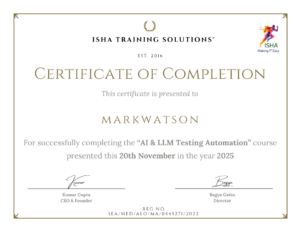
- Course Completion Certificate
What will I learn by the end of this course?
- Master Playwright with Python to automate modern web applications efficiently.
- Write and Execute Automated Tests using PyTest and Playwright.
- Handle Web Elements including dynamic elements, dropdowns, alerts, frames, windows, and browser interactions.
- Build Scalable Automation Frameworks using the Page Object Model (POM) and reusable components.
- Perform API Testing and integrate API validation into your automation workflows.
- Manage Test Data and implement data-driven testing techniques.
- Implement Assertions and Debugging to identify, troubleshoot, and resolve automation failures.
- Generate Test Reports to analyze execution results and communicate test outcomes.
- Integrate Automation with CI/CD Pipelines using tools such as GitHub Actions.
- Apply Automation Best Practices to develop maintainable, reliable, and reusable test scripts.
- Explore AI and LLM Chatbot Testing to validate AI-driven applications and evaluate response quality.
- Develop Real-World Automation Projects that demonstrate your practical knowledge and framework-building skills.
Course Syllabus:
Module 1: Python Fundamentals for Test Automation
- Python installation and development environment setup
- Variables, data types, operators, conditional statements, and loops
- Functions, parameters, and reusable methods
- Object-Oriented Programming (OOP): classes, objects, inheritance, and encapsulation
- File handling, JSON, modules, and packages
- Virtual environments and test data management
Module 2: Playwright Fundamentals
- Introduction to Playwright and its architecture
- Installing and configuring Playwright with Python
- Synchronous and asynchronous APIs
- Browser, BrowserContext, and Page concepts
- Launching Chromium, Firefox, and WebKit
- Headed and headless execution
- Browser tabs, multiple pages, popups, and iframes
- Screenshots and video recording
Module 3: Locators, Web Elements, and Browser Interactions
- Playwright locator strategies
- Role-based, text-based, CSS, and XPath locators
- Locator chaining and dynamic elements
- Click, fill, keyboard, mouse, hover, and scrolling actions
- Dropdowns, forms, alerts, and file uploads/downloads
- Auto-waiting, timeouts, and synchronization
- Handling dynamic web elements and flaky tests
Module 4: PyTest Framework and Test Execution
- PyTest fundamentals and test organization
- Test discovery, execution, and assertions
- PyTest markers and configuration using
pytest.ini - Fixtures, fixture scopes, and
conftest.py - Setup and teardown methods
- Parameterization and data-driven testing
- Parallel execution using
pytest-xdist - Environment variables and configuration management
Module 5: Page Object Model (POM) and Framework Development
- Introduction to Page Object Model
- Creating page classes and reusable methods
- Base Page and Base Test classes
- Framework folder structure and architecture
- Locator and test data management
- Reusable utilities and helper functions
- Environment configuration and secrets management
- Building maintainable and scalable automation frameworks
Module 6: API Testing with Playwright
- API testing fundamentals and HTTP methods
- Playwright
APIRequestContext - GET, POST, PUT, and DELETE requests
- Request headers, parameters, and payloads
- Authentication and bearer tokens
- Response validation and status code assertions
- API-based test data setup and cleanup
- Integrating API testing with UI automation
Module 7: Advanced Playwright Automation
- Cross-browser testing with Chromium, Firefox, and WebKit
- Storage state, authentication, and session reuse
- Mobile device emulation and responsive testing
- Geolocation and browser permissions
- Network interception, request blocking, and response mocking
- Debugging with Playwright Trace Viewer
- Analyzing failures and improving test reliability
Module 8: Chatbot Automation Using Playwright
- Challenges of automating AI chatbots
- Automating chat inputs and send buttons
- Extracting dynamically generated chatbot responses
- Handling streaming responses and typing indicators
- Managing response completion and variable timing
- Browser microphone permissions and mock audio streams
- Voice input automation and Web Speech API interception
- Capturing and validating spoken output
Module 9: Local LLM Evaluation Using Ollama
- Introduction to LLM testing and non-deterministic responses
- Installing and configuring Ollama
- Setting up a local AI testing environment
- Understanding the LLM-as-a-Judge approach
- Designing evaluation prompts
- Semantic response validation
- Expected-versus-actual response comparison
- Structured JSON evaluation and PASS/FAIL results
Module 10: AI-Powered Testing with PyTest and Playwright
- Integrating Playwright, PyTest, and AI evaluation
- Browser and context fixtures for chatbot testing
- Extracting chatbot responses for evaluation
- Sending responses to Ollama
- Converting AI evaluations into PyTest assertions
- Text and voice chatbot response verification
- Building an end-to-end AI testing pipeline
- Generating automated test results
Module 11: CI/CD Integration Using GitHub Actions
- Git and GitHub fundamentals
- Introduction to GitHub Actions and workflow configuration
- Automating Playwright test execution
- Running tests on pull requests
- Managing environment variables and secrets
- Executing tests in CI environments
- Publishing test reports and artifacts
- Integrating UI, API, and AI testing into CI/CD pipelines
Final Capstone Project: AI-Powered Playwright Automation Framework
- Build a complete Python and Playwright automation framework
- Implement PyTest and Page Object Model
- Integrate UI and API automation
- Develop chatbot text and voice automation
- Integrate Ollama-based LLM evaluation
- Implement AI-based PASS/FAIL assertions
- Configure GitHub Actions CI/CD
- Generate and publish automated test reports
FAQ’s for AI-Powered Playwright Automation Course:
1. What is the AI-Powered Playwright Automation Course?
This course teaches you to automate web applications using Playwright with Python, covering UI automation, API testing, PyTest, framework development, chatbot automation, AI/LLM evaluation, and CI/CD integration.
2. Who can enroll in this course?
QA Engineers, Manual Testers, Automation Testers, Python Developers, Selenium Professionals, API Testers, and working professionals who want to upgrade their automation skills can enroll.
3. Do I need prior programming experience?
Basic knowledge of Python programming and software testing concepts is recommended. Beginners who are willing to practise coding can also benefit from the training.
4. What will I learn in this course?
You will learn Playwright automation with Python, PyTest, Page Object Model (POM), API testing, cross-browser testing, chatbot automation, LLM evaluation using Ollama, and CI/CD integration using GitHub Actions.
5. What makes this course different from a regular Playwright course?
In addition to traditional web automation, this course covers AI-powered chatbot testing, text and voice automation, local LLM evaluation, and AI-based test assertions, helping you explore modern automation testing techniques.
6. Will I learn Python from scratch?
The course includes Python essentials required for automation, such as variables, functions, OOP, file handling, JSON, and reusable methods. Basic Python knowledge is helpful for progressing through the advanced modules.
7. Will I work on real-time projects?
Yes. The curriculum includes practical assignments and mini-projects covering UI automation, API testing, framework development, chatbot testing, and AI-based response evaluation, followed by a final capstone project.
8. What is Ollama, and why is it included?
Ollama allows you to run supported language models locally. In this course, it is used to explore AI response evaluation and the LLM-as-a-Judge approach for assessing chatbot responses.
9. Will I learn API testing using Playwright?
Yes. You will learn to send API requests, validate responses, work with authentication, and integrate API testing with browser-based automation workflows.
10. Will I learn to build an automation framework?
Yes. You will learn to develop a reusable and maintainable framework using Python, Playwright, PyTest, Page Object Model, fixtures, configuration management, and reporting.
11. Does the course cover CI/CD integration?
Yes. The course covers GitHub Actions, automated test execution, pull-request workflows, environment variables, secrets management, and publishing test reports and artifacts.
12. What will I be able to do after completing the course?
You will be prepared to develop and maintain Playwright automation frameworks, automate UI and API workflows, explore AI chatbot testing, evaluate LLM responses, and integrate automated tests into CI/CD pipelines.
How can I enroll for this course?
OR
For any other details, Call me or Whatsapp me on +91-9133190573
Live Sessions Price:
For LIVE sessions – Offer price after discount is 200 USD 159 89 USD Or USD15000 INR 13000 INR 6900 Rupees.
Sample Course Completion Certificate:
Your course completion certificate looks like this……
Course Policy :
Once payment is made, no refund will be provided.
If you do not attend the course, the payment cannot be transferred to another batch.
Course repetition is not allowed for missed sessions
We request all learners to attend the scheduled sessions regularly and make the most of their learning journey. Thank you for your understanding and continued support.